Fleuron contributors · Reviewed
How to code interview transcripts in Fleuron
Practice importing an interview, coding a passage, revising an interpretation and exporting your work. No account or real participant data is needed.
All interview text and analysis below are fictional demonstration material under CC0-1.0. The coding choices illustrate a workflow, not findings about gardeners or a model answer.
1. Download the practice interviews
Each file format contains the same six turns. Choose one format for each interview; importing all three creates duplicates. The timestamps in the WebVTT files are invented.
- Interview 01: plain text · WebVTT · Word .docx
- Interview 02: plain text · WebVTT · Word .docx
2. Create a separate practice study
Download Fleuron and follow the installation guide, including its warnings that mean stop. Supported: macOS 14+ (Intel and Apple Silicon universal build) and Windows 11 x64. macOS 10.15–13 and Windows 10 are best effort. No Linux or native Windows ARM package is provided.
Create a new local study called Community garden practice, with Practice coder as the coder. Choose a separate folder for this exercise. Do not open, reset or reuse an existing research study. Leave collaboration off.
Import interview-01, then interview-02, and give them the labels Volunteer A and Volunteer B. Check that interviewer and volunteer turns remain separate and that the text matches the supplied file. A successful import is worth checking before any coding.
3. Code one phrase and one whole turn
In Volunteer A’s first answer, select this exact phrase:
Now I stay to help the next person get started.
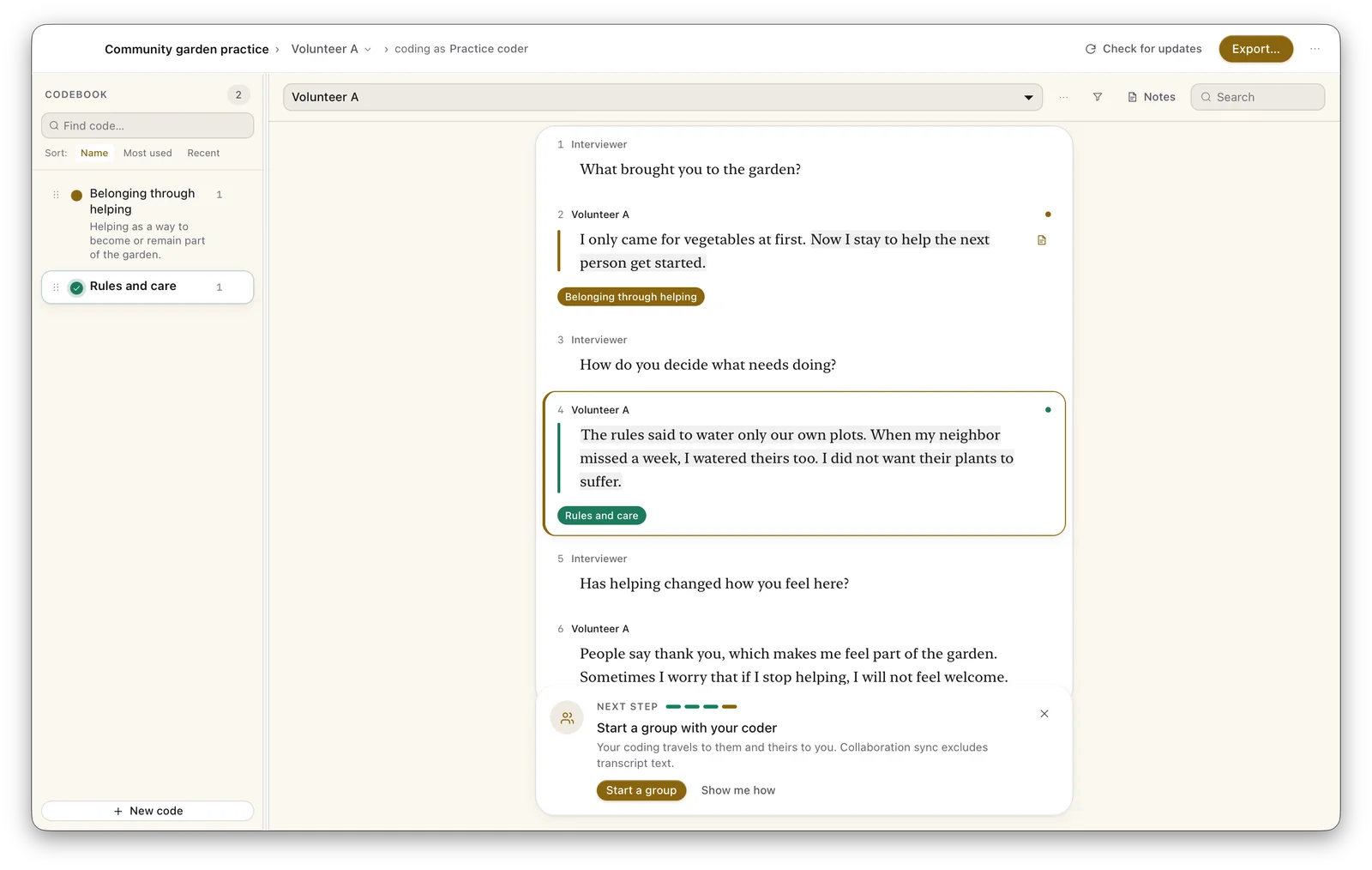
Use the coding bubble to create and apply Helping newcomers. This preserves the selected phrase as a coded span. Then select the entire answer about watering a neighbor’s plot and apply a second code, Rules and care, to that whole turn. Inspect both coded extracts to confirm their boundaries.
The code names describe your current reading. You can apply more than one code to a passage; the software does not determine which interpretation is right.
4. Revise a code as you read further
Read the rest of both interviews. Volunteer A worries about being welcome if they stop helping; Volunteer B wants a quiet week without explanation. Rename Helping newcomers to Belonging through helping and add an optional definition: Helping as a way to become or remain part of the garden. Revisit the earlier extract after renaming.
This is a revision to try, not a required conclusion. A different research question could make obligation, reciprocity or access more useful starting points. Keep notes about why you changed your interpretation.
5. Write a memo and retrieve the evidence
Add a coding memo to the selected phrase:
I first read helping as enjoyment. The later concern about being welcome suggests belonging may feel conditional. I need to compare this with the request for a quiet week.
Write a broader interview memo about that uncertainty. Open the code’s associated passages and check each extract against the surrounding transcript. A short quote in a list loses context; return to the full interview before treating it as evidence.
6. Export and inspect
Open Export and choose the Reflexive thematic analysis preset. Keep HTML report, PDF report, coded segments, codebook and memos selected. Code-frequency tables are omitted by default; overview and extract totals still appear. Choose a new output folder for the practice study.
Open the HTML and PDF. Check the phrase boundary, renamed code, memo and coder label. Open the coded-segments CSV in a spreadsheet or text editor and compare its quoted text with the source. Make these checks on your own exports too.
- Example HTML report
- Example PDF report
- Example coded-segments CSV
- File sizes, SHA-256 hashes and export provenance
The example outputs are generated through Fleuron’s native development build. Their manifest identifies the tested source version; they are not a claim that every distributed installer or supported OS was tested.
Before using your own interviews
Fleuron's collaboration sync excludes transcript text and memo fields. Codebook definitions, examples and study labels sync as written. Keep identifying information out of those fields, including quotes copied from transcripts. Exports and backups are saved where you choose; they may leave your device when you share them or use a synced folder.
Coding works without an internet connection. Automatic update checks contact GitHub at startup and periodically while the app is open; you can turn them off in Settings. Sign-in, session renewal and collaboration contact the configured service when those features are used.
Continue with the reflexive thematic analysis workflow. If you need to code audio or video directly rather than its transcript, compare the other tools.